Overview
If you use Stripe to process payments, you probably need to send invoices. Stripe sends receipts by default, but a receipt is not an invoice. Maybe your B2B customers need proper invoices for tax deductions, maybe it is a legal requirement in your country, or maybe you just want a proper paper trail for every transaction.
You have a few options: Stripe has its own invoicing feature built into the dashboard, you can create invoices manually with accounting software, or you can automate everything with a tool that generates invoices from your Stripe payments automatically.
This guide covers all three. By the end you will know which method fits your business, how much each costs, and how to set it up.
Stripe's Built-in Invoicing
Stripe Invoicing lets you create and send invoices directly from the Stripe Dashboard. Each invoice includes a hosted payment page where your customer can pay by card, bank transfer, or other methods. It works well and looks professional.
Here is what it does:
- Manual invoice creation - add line items, set payment terms, send to customer via email
- Automatic subscription invoicing - generates an invoice every billing cycle if you use Stripe Billing
- Payment collection - the invoice itself is the payment mechanism, with a hosted pay page
- Customizable templates - add your logo, business details, and tax info
The important thing to understand: Stripe Invoicing is designed as a payment collection tool. The invoice includes a pay button. This is great if you want to bill someone who has not paid yet, but overkill if you just need to document a payment that already happened.
The catch: Stripe charges 0.4% per invoice (capped at $2) on top of your processing fees. That adds up fast.
What Stripe Invoicing Actually Costs
0.4% does not sound like much. But look at what it adds up to over a year:
| Monthly invoices | Avg. amount | Monthly cost | Annual cost |
|---|---|---|---|
| 50 | $200 | $40 | $480 |
| 200 | $300 | $240 | $2,880 |
| 500 | $500 | $1,000 | $12,000 |
For many businesses, these invoices are just documentation for payments that have already been collected through Checkout, subscriptions, or the API. Paying a percentage fee for what is essentially a PDF does not make sense at scale.
Want to see the exact numbers for your business? Use our Stripe invoice calculator.
3 Ways to Send Invoices from Stripe Payments
There is no single right way to handle invoicing with Stripe. It depends on your volume, budget, and how much time you want to spend on it.
A. Stripe's Built-in Invoicing
Use Stripe's native feature from the Dashboard or API. Invoices include a payment link so customers can pay directly.
Cost: 0.4% per invoice (capped at $2) + processing fees
Effort: Low. Turn it on in settings.
Best for: Low volume, or when invoices are your payment collection method.
B. Manual Invoicing with Accounting Software
Use Xero, QuickBooks, or FreshBooks to create invoices for each Stripe payment. Some sync with Stripe for reconciliation, but none auto-generate invoices from payment events.
Cost: $19-$65/month depending on platform
Effort: High. Manual creation or Zapier automations needed.
Best for: Businesses that need full accounting bundled with invoicing.
See our full invoicing alternatives comparison.
C. Automatic Invoicing with Stripdo
Connect Stripdo to your Stripe account. Every successful payment automatically generates a professional PDF invoice and emails it to your customer. No manual work.
Cost: $39/year flat. Unlimited invoices.
Effort: Minimal. Connect Stripe, customize template, done.
Best for: Any Stripe user who already collects payments and needs invoices sent automatically.
The question is simple: do you need invoices to collect payments, or to document payments already collected? If invoices are your payment mechanism, use Stripe Invoicing. If you collect payments through Checkout, subscriptions, or the API and just need invoices sent afterwards, Stripdo is the simplest option.
How to Automate Stripe Invoices with Stripdo
Setting up takes about a minute:
- Create your account at the Stripdo dashboard. No credit card required.
- Connect your Stripe account via a restricted API key. Stripdo gets read-only access to payment data. It never touches your funds.
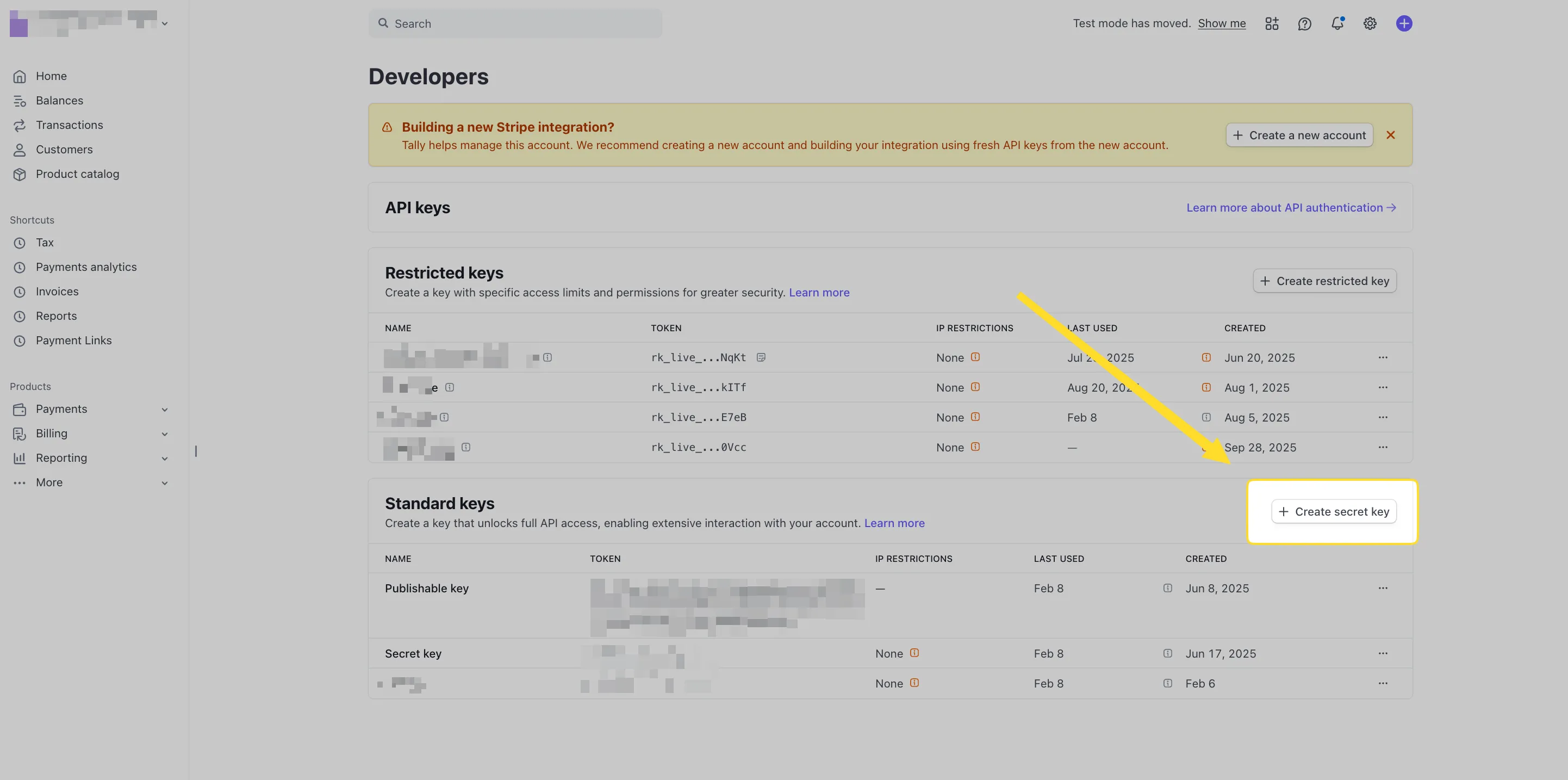
Go to Developers → API keys in your Stripe Dashboard and click “Create secret key” 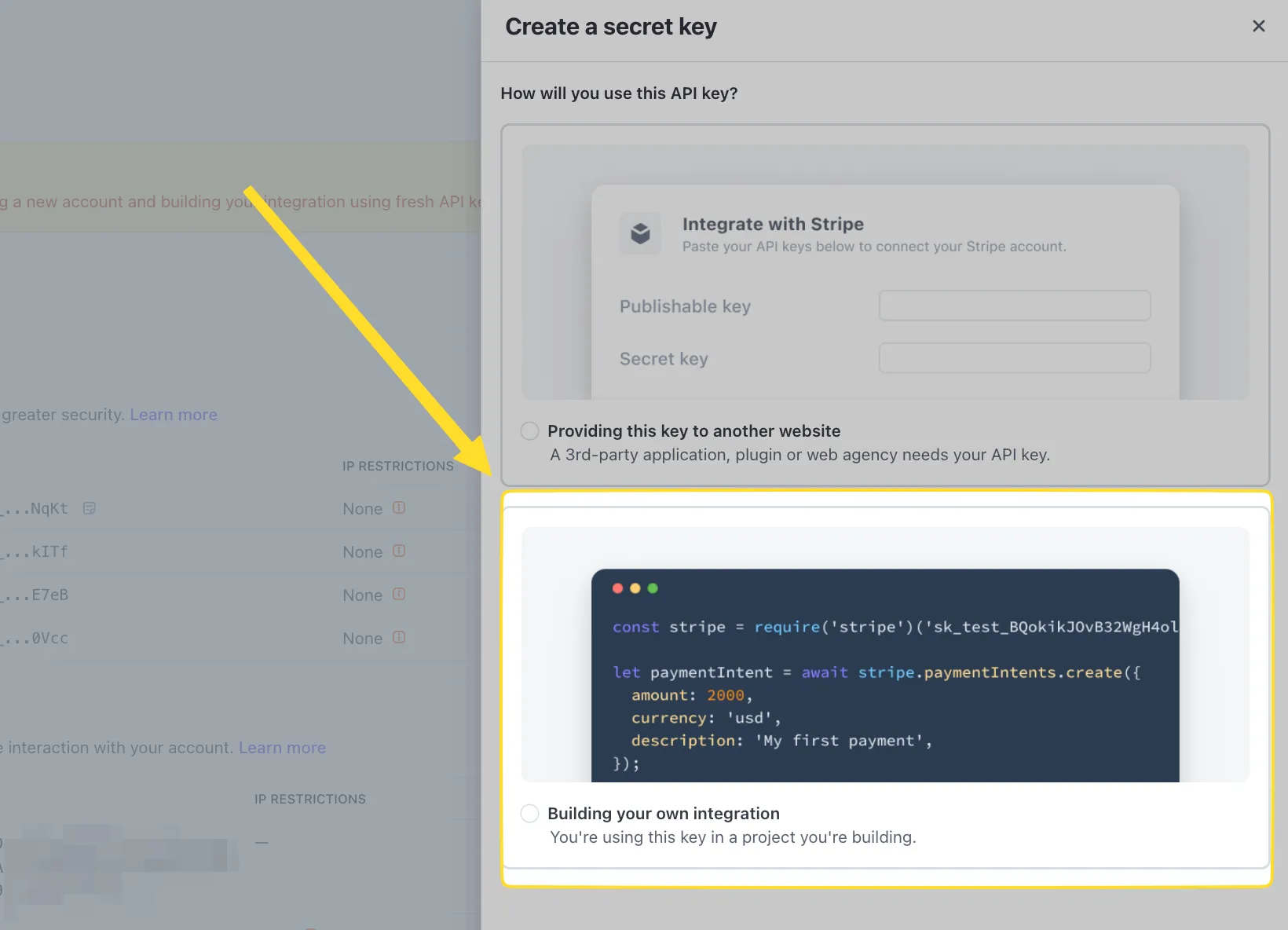
Select “Building your own integration” when creating the key for Stripdo - Customize your invoice template - add your logo, business name, address, tax/VAT number, and any custom fields.
- Invoices go out automatically - every successful Stripe payment triggers a PDF invoice emailed to the customer.
- Backfill past invoices (optional) - generate invoices for payments that happened before you connected Stripdo.
No code, no Zapier, no API integration. Works with subscriptions, one-time payments, Checkout sessions, and payments via the Stripe API.
Auto-generate invoices from Stripe
$39/year flat. Unlimited invoices. No per-invoice fees.
When to Use Stripe's Built-in Invoicing
Stripe Invoicing is a solid product. Here is when it makes sense:
- You use invoices to collect payment - your business model is "send invoice, customer pays it." The hosted payment page and reminders are genuinely useful here.
- Low volume - under 10 invoices per month at modest amounts. The fee is small enough to not matter.
- Deep Stripe Billing usage - subscriptions, proration, dunning all managed through Stripe Billing. Keeping invoicing in the same system simplifies things.
When to Use Stripdo Instead
- You already collect payments through Stripe - Checkout, subscriptions, or the API. The payment is done. You just need an invoice sent.
- 50+ invoices per month - at this volume, Stripe Invoicing costs $480+/year. Stripdo costs $39.
- Fully automatic - no manual creation, no batch processing. Every payment gets an invoice.
- Past payments need invoices - retroactive invoicing for your Stripe history.
- Predictable costs - $39/year whether you send 10 or 10,000 invoices.
For a detailed comparison, see Stripdo vs Stripe Invoicing or browse all Stripe invoicing alternatives.
At 200 invoices/month, Stripe Invoicing costs $2,880/yr. Stripdo costs $39/yr. See your exact savings.
Frequently Asked Questions
Does Stripe charge for sending invoices?
Yes. Stripe charges an additional 0.4% fee per invoice (capped at $2) on top of your standard processing fees. At 100 invoices per month averaging $300, that is $1,440 per year in invoicing fees alone.
How do I send automatic invoices from Stripe?
You can enable Stripe's built-in invoicing (which charges 0.4% per invoice), or use Stripdo which connects to your Stripe account and emails invoices automatically for every payment at $39/year flat.
What is the Stripe invoicing fee?
0.4% of the invoice amount, capped at $2.00. This is separate from payment processing fees. A $500 invoice costs $2.00 extra, a $200 invoice costs $0.80.
Can I send invoices without using Stripe Invoicing?
Yes. You can use any invoicing tool alongside Stripe. Stripdo connects to your Stripe account and sends invoices from your payments automatically, bypassing Stripe's invoicing feature and its 0.4% fee entirely.
Can I send invoices for past Stripe payments?
Stripe's built-in invoicing only works for new transactions. Stripdo supports retroactive invoicing, so you can generate invoices for payments that already happened in your Stripe account.
What is the best way to send invoices with Stripe in 2026?
For high-volume businesses (50+ invoices/month), the most cost-effective approach is Stripdo at $39/year for unlimited invoices. For low volume or when you need invoices as payment requests, Stripe's built-in invoicing works well despite the per-invoice fee.
Ready to stop overpaying?
Set up in under a minute. No code, no per-invoice fees.